Streamline Video Production with the Infographics Call Out MOGRT for Premiere Pro
For editors working in Adobe Premiere Pro, integrating high-quality animated graphics often means navigating between multiple applications or relying on static assets. The Infographics Call Out Premiere Pro project addresses this workflow gap directly by packaging a complete animated infographics set as a Motion Graphics Template (MOGRT) file. This format is designed for seamless use within Premiere Pro's Essential Graphics panel, offering a practical solution for adding dynamic information highlights to video content.
A Direct Integration for Animated Call Outs
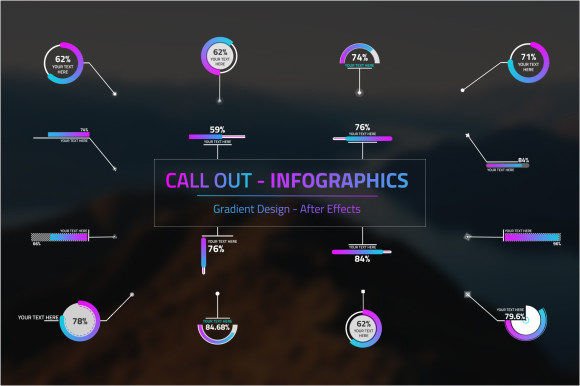
The core value of the Infographics Call Out Premiere Pro template lies in its native Premiere Pro compatibility. Unlike an After Effects project that requires round-tripping between software, the MOGRT file allows you to import and work with the assets directly in your editing timeline. This integration eliminates a significant step in the production process, saving time and reducing technical complexity. You can drag the template from the Essential Graphics panel into your sequence and begin customizing it immediately, a feature that streamlines workflows for tight deadlines or iterative editing.
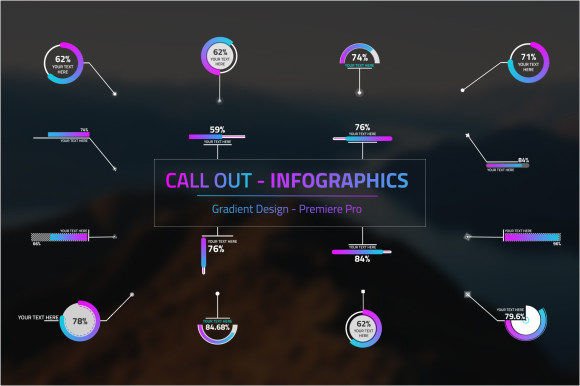
The template retains the original project’s visual design, including its gradient style and animation profiles. This ensures that the final output maintains a professional and cohesive aesthetic. The advantage here is consistency; you are applying a pre-built, visually unified set of elements rather than piecing together disparate designs, which helps maintain a polished look throughout a video project.
Key Features and Practical Functionality
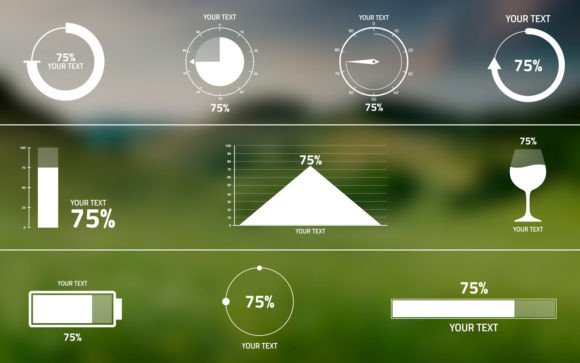
The provided set includes sixteen distinct call-out designs paired with corresponding target points. This variety offers a reasonable range of options for common scenarios, such as highlighting statistics, pinpointing locations on a map, or emphasizing key quotes. The ability to automate values is a notable feature, allowing for dynamic updates to numbers or text without manually reanimating each element. In practice, this means you can create a data-driven segment where figures change according to a script or source, enhancing the narrative’s credibility and engagement.
From a usability standpoint, the customization parameters exposed in the Essential Graphics panel are crucial. You can modify the color scheme to align with your project's brand, adjust the size and position for proper composition, and even tweak the animation timing to match the pace of your scene. This level of control within Premiere Pro provides significant flexibility, making the template adaptable for different video styles—from brisk promotional clips to more measured documentary presentations.
Evaluating Real-World Performance and Reliability
In operational terms, a well-built MOGRT should perform reliably without causing playback lag or complicating the render process. Based on its described structure, the Infographics Call Out Premiere Pro template appears designed for efficiency, utilizing Premiere Pro's native graphic rendering capabilities. For most standard editing workstations, performance should be stable. Its effectiveness is tied directly to its purpose: conveying information visually with enhanced motion. The animated call outs are likely to draw viewer attention effectively, making them suitable for sections where information retention is key.
The template’s long-term value depends on its reusability and the breadth of projects it supports. Having a collection of sixteen templates means it can serve multiple projects without feeling repetitive, provided the core gradient style fits your ongoing visual needs. It represents a durable asset for creators who regularly produce content requiring data visualization or explanatory highlights.
Who Benefits Most from This Asset?
The primary beneficiaries are video editors, content marketers, and educators who primarily operate within Adobe Premiere Pro and need to elevate their content’s informational clarity without diving into complex motion graphics software. Freelancers and small business owners producing promotional videos or tutorial content will find it particularly useful, as it offers a professional look that might otherwise require custom design work or additional software subscriptions.
Serious hobbyists creating documentaries or presentation videos can also leverage this template to improve production value. Its applicability spans situations where clarity and visual polish are important but resources or time for custom animation are limited. For teams working in a shared Premiere Pro environment, using a standardized MOGRT ensures graphic consistency across different editors' outputs.
Considerations and Potential Limitations
While the Infographics Call Out Premiere Pro template offers clear advantages, it is important to assess its fit for specific needs. The design is locked into a particular gradient style. If your project demands a completely different aesthetic—for instance, a flat design or a corporate minimalist look—the color and shape customization might not be sufficient for a full overhaul. The animations are predefined; you cannot fundamentally change the motion path or physics within Premiere Pro, only adjust timing and scale.
The set of sixteen call outs is robust but finite. For highly specialized projects requiring very unique graphic representations, you may need to supplement this template with custom assets. Furthermore, its utility is exclusive to Premiere Pro users. Editors working in other platforms or those who do not have access to the Essential Graphics panel feature will not be able to utilize this specific MOGRT file.
Practical Recommendations for Use
To integrate this template effectively, start by importing it into a test sequence to explore all customizable parameters. Familiarize yourself with how the color controls affect the gradient and how the text layers interact with the animation. Use it initially in a project where visual consistency is beneficial, such as a series of explainer videos. By standardizing your call-out graphics across episodes, you reinforce brand identity and reduce per-video design time.
Combine the automated value features with dynamic data, such as survey results or progress metrics, to create engaging updates within a single video. Remember that while the graphics enhance presentation, their effectiveness ultimately depends on clear, concise accompanying narration or text. The template is a tool for emphasis, not a replacement for well-structured content.
The Infographics Call Out Premiere Pro MOGRT represents a focused solution for a common editing need. It balances ease of use with sufficient customization, making it a worthwhile consideration for Premiere Pro-centric workflows that regularly incorporate informational graphics. By evaluating its style against your project requirements and its functionality against your typical editing process, you can determine if it serves as a efficient asset in your production toolkit.