Bringing Data to Life: The Power of Gradient Call Outs in After Effects
In a world saturated with information, making your data stand out is a critical challenge. Whether it's for a corporate presentation, an educational video, or a social media campaign, viewers need to grasp key points quickly and clearly. Static numbers and plain text often fail to capture attention. This is where the visual artistry of motion graphics, specifically within Adobe After Effects, becomes invaluable. A specialized tool like the Infographics Call Out After Effects project file offers a targeted solution, transforming raw data into compelling visual stories.
What Are Call Outs and Why Do They Matter?
A call out is a design element that literally calls out important information. It acts as a visual spotlight, isolating a statistic, a fact, or a key term from the broader content to emphasize its significance. Think of a highlight box in a textbook, but animated and integrated seamlessly into a moving video. In motion graphics, a call out isn't just a box; it's an entry point for the viewer's focus. Without effective call outs, critical data can blur into the background, reducing the impact and retention of your message. The Infographics Call Out project is built specifically to solve this problem within the After Effects environment.
The Gradient Style: Modernity and Depth
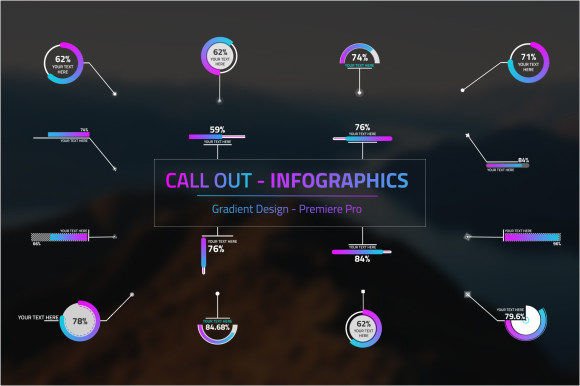
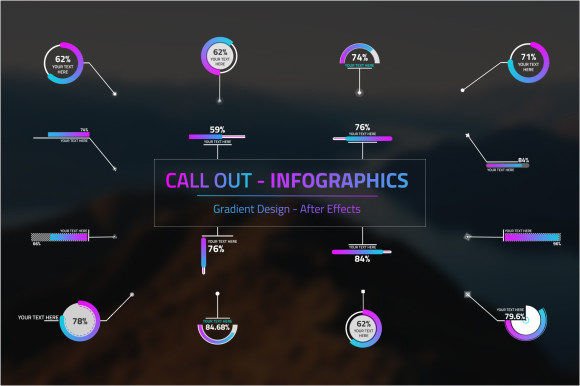
The defining feature of this particular project file is its use of gradient styling. Unlike flat, single-color shapes, gradients blend multiple colors smoothly, creating a sense of depth, energy, and modernity. A gradient can evoke emotion—a warm orange-to-yellow gradient feels energetic, while a cool blue-to-purple feels calm and professional. This style moves away from the clinical, often sterile look of traditional infographics. The Infographics Call Out After Effects file leverages this aesthetic, allowing the call out itself to become a subtle piece of art that enhances the data it presents.
From a practical standpoint, gradients are incredibly versatile. The customizable gradient in this project means you can match your brand colors exactly or create a palette that suits the tone of your project. It allows for seamless integration, ensuring your call outs feel like a native part of your video's design language, not a tacked-on afterthought.
Unpacking the Customization Features
A pre-built project file is only as good as its flexibility. The true value of the Infographics Call Out After Effects template lies in its extensive customization parameters, designed for users who need efficiency without sacrificing creative control.
- Core Content Control: Every call out is a vessel for your information. You can easily input your own text, numbers, or even replace elements with custom icons. This means a single project file can be used to highlight a sales figure, a process step, or a customer testimonial.
- Dynamic Shape and Size Adjustment: Not all information is equal. A major headline statistic might need a large, central call out, while a supporting detail might require a smaller, subtler one. The ability to adjust the size and shape ensures your visual hierarchy remains clear and adaptable to any scene composition.
- Precision Placement: Positioning is key in motion graphics. The project file enables you to place the call out exactly where the viewer's eye should go, whether it's next to a product, over a map location, or following an animated character.
- Built-in Animation: Perhaps most importantly, these call outs are animated. They don't just appear; they enter the scene with purpose—perhaps fading in, scaling up, or sliding into position. This controlled movement guides the viewer's attention smoothly and makes the revelation of information a dynamic part of the narrative flow.
These features collectively mean that while you start with a professionally designed foundation, you end with a unique asset tailored to your specific message.
Fitting Into Modern Creative Workflows
Today's content creators, from marketing agencies to independent video producers, operate under tight deadlines and high quality expectations. Using a base template like the Infographics Call Out project doesn't shortcut creativity; it streamlines production. Instead of building a call-out animation system from scratch—a process that involves designing shapes, applying gradients, rigging text layers, and creating animations—you begin with a fully functional, aesthetically polished system.
This approach fits perfectly into iterative workflows. You can create a master project with your branded gradient and animation style, then duplicate and modify call outs for different clients or videos throughout the month. It becomes a reusable asset in your toolkit, saving hours of repetitive work and ensuring consistency across your projects. For freelancers and small teams, this efficiency directly translates to increased capacity and profitability.
Practical Benefits for Your Projects
Adopting a dedicated call-out template brings several tangible advantages to any project that relies on data visualization.
Enhanced Communication: The primary benefit is clearer communication. A well-animated, visually distinct call out ensures your audience sees and remembers your key points. This is crucial for training videos where learning objectives must be emphasized, or for investor presentations where financial milestones need to stand out.
Elevated Professional Quality: The gradient design and smooth animations immediately elevate the perceived quality of your work. It signals a thoughtful, polished production, which builds trust and credibility with your audience.
Speed to Market: As discussed, the time saved is significant. This allows you to respond faster to client requests, produce more content, or dedicate saved time to other creative aspects of your project, like storyboarding or sound design.
Creative Consistency: Maintaining a uniform look across a series of videos or a campaign is easier when you start from the same design base. The Infographics Call Out After Effects file acts as a style guide for your data presentations.
Considerations Before You Use It
While powerful, a project file like this is a tool, and its effectiveness depends on how you use it. A few considerations will ensure you get the best results.
- Match the Tone: The gradient style is modern, but ensure its colors and animation speed match the overall emotion of your video. A fast, bright gradient might clash with a serious documentary tone.
- Don't Overuse: Call outs are for emphasis. If every piece of information has a flashing call out, the screen becomes chaotic and the emphasis is lost. Use them strategically for your truly key data points.
- Integrate, Not Isolate: The call out should feel connected to the scene. Use its customizable position and size to place it logically relative to other on-screen elements. It should complement the composition.
- Test Accessibility: Ensure your chosen color gradient provides enough contrast for the text to be easily readable. Also, consider if the animation is too rapid for some viewers. Customization allows you to adjust for these concerns.
Real-World Applications and Scenarios
Where might you see the Infographics Call Out After Effects project in action? Its applications span numerous industries.
In Marketing and Advertising, it's perfect for showcasing product features in explainer videos, highlighting user testimonials, or presenting campaign performance metrics in internal reviews.
For Education and E-Learning, instructors can use it to emphasize key terms in instructional videos, call out important historical dates, or highlight critical steps in a software tutorial.
Corporate Communications teams can leverage it in annual report videos, employee onboarding sequences, or safety training modules to make essential policies and figures unmistakable.
Even Social Media Content Creators can use these call outs in short, impactful videos to present quick facts, travel statistics, or DIY project results in a format that's designed to grab scrolling attention.
Ultimately, the Infographics Call Out After Effects project file is more than just a set of animated shapes. It's a bridge between raw information and human understanding. By providing a system that is both visually arresting and deeply customizable, it empowers creators to present data with clarity, style, and impact, turning numbers and facts into memorable moments within any moving visual story.